 E-Code
How to convert a number to binary on a TI-89 Titanium
Type the number, press 2nd 5 for MATH, ▲ to Base (the last item) and ▶ to open it, then 1 for ▶Bin and ENTER: 256▶Bin gives 0b100000000.
Step by step
- Type the number. 2 5 6 Type 256.
- Open MATH. 2nd 5 Press 2nd, then 5. MATH is written above 5.
- Go to Base. ▲ Press ▲ once. The menu wraps round to its last item, Base.
- Open Base. ▶ Press ▶ to open the Base menu: ▶Bin, ▶Dec and ▶Hex.
- Pick ▶Bin. 1 Press 1 for ▶Bin, convert to binary.
- Convert it. ENTER Press ENTER.
- Read the answer. 0b100000000: the 0b means binary. 256 is 2 to the 8th, a 1 and eight 0s. ▶Hex works the same way.
What the screen shows
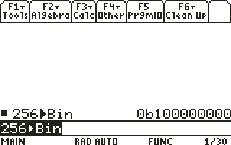
0b100000000: the 0b means binary. 256 is 2 to the 8th, a 1 and eight 0s. ▶Hex works the same way.
Look for 0b100000000 on the screen.
Try it with the keys lit up
This guide is one of E-Code's Learn lessons. Open it on E-Code's TI-89 calculator and each key lights up in turn as you press it.
Try “Convert a number to binary” on the TI-89 calculator
Related
- Multiply complex numbers for AC circuits
- Solve simultaneous equations with a matrix
- Find the eigenvalues of a matrix
- Solve an RC circuit with a differential equation
Engineering programs for the TI-89 Titanium:
- RLC resonance, Q, bandwidth and impedance
- Beam reactions, shear and moment for a point load
- Propped cantilever by double integration, step by step
All TI-89 engineering guides · All TI-89 guides · All calculator guides