 E-Code
How to use engineering notation on a TI-84 Plus CE
Press MODE (the cursor starts on NORMAL), ▶ twice onto ENG and ENTER, then 2nd QUIT. Every answer then shows its power of ten in steps of 3: E3 is kilo, E-3 milli, E-6 micro.
Step by step
- Open MODE. MODE Press MODE. The cursor is already on NORMAL, in the NORMAL SCI ENG row.
- Move to ENG. ▶ ▶ Press ▶ twice to move onto ENG.
- Turn on ENG. ENTER Press ENTER. ENG is now highlighted.
- Go back home. 2nd MODE Press 2nd, then MODE (QUIT).
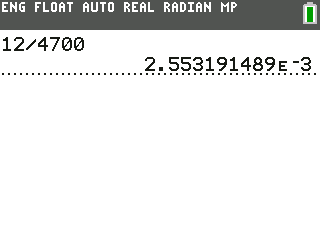
- 12 V across 4.7 kΩ. 1 2 ÷ 4 7 0 0 Type 12 ÷ 4700 to find the current through a 4.7 kΩ resistor at 12 V.
- Get the current. ENTER Press ENTER.
- Read it as milliamps. 2.553…E-3 means 2.55 × 10⁻³ A, which is 2.55 mA. E3 is kilo, E-3 milli, E-6 micro.
What the screen shows
2.553…E-3 means 2.55 × 10⁻³ A, which is 2.55 mA. E3 is kilo, E-3 milli, E-6 micro.
Look for 2.55 on the screen.
Try it with the keys lit up
This guide is one of E-Code's Learn lessons. Open it on E-Code's TI-84 calculator and each key lights up in turn as you press it.
Try “Use engineering notation” on the TI-84 calculator
Related
- Use engineering notation (TI-84 Plus)
- Convert a complex number to polar form
- Solve simultaneous equations
- Find the determinant and inverse of a matrix
- Use variables as integral limits (TI-84 Plus CE)
Engineering programs for the TI-84 Plus CE:
All TI-84 engineering guides · All TI-84 guides · All calculator guides