 E-Code
How to find mean, median and quartiles on a TI-89 Titanium
Press APPS, 6 for the Data/Matrix Editor and 3 for New, name the data set in the Variable box and press ENTER twice. Type the numbers into c1, press F5 (Calc) with OneVar on c1 and ENTER: STAT VARS shows x̄, medStat, q1 and q3.
Step by step
- Open the apps. APPS Press APPS to see the list of applications.
- Pick the Data/Matrix Editor. 6 Press 6 for Data/Matrix Editor. It opens a small menu.
- Make a new data set. 3 Press 3 for New. The NEW box opens with Type set to Data.
- Go to Variable. ▼ ▼ Press ▼ twice to reach the Variable box, where the data set gets its name.
- Name it d. , Press the , key. Letters are already on in this box, so it types d (the letter above the comma).
- Create it. ENTER ENTER Press ENTER twice: once to finish the name, once for OK. An empty table opens.
- Type the data. 2 ENTER 4 ENTER 4 ENTER 6 ENTER Type 2, 4, 4 and 6 into column c1, pressing ENTER after each one. The cursor moves down a row each time.
- Open Calc. F5 Press F5 for Calc. The Calculate box is set to OneVar on column c1: one-variable stats.
- Work out the stats. ENTER Press ENTER for OK. STAT VARS opens with every one-variable result.
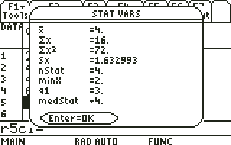
- Read the results. x̄ = 4 is the mean, nStat = 4 is how many values, medStat = 4 is the median, and q1 and q3 are the quartiles.
What the screen shows
x̄ = 4 is the mean, nStat = 4 is how many values, medStat = 4 is the median, and q1 and q3 are the quartiles.
Look for nStat=4 on the screen.
Try it with the keys lit up
This guide is one of E-Code's Learn lessons. Open it on E-Code's TI-89 calculator and each key lights up in turn as you press it.
Try “Find mean, median and quartiles” on the TI-89 calculator
Related
Statistics programs for the TI-89 Titanium: