 E-Code
How to get a decimal instead of a fraction on a TI-89 Titanium
Press ◆, then ENTER (≈) instead of ENTER: 1/3 then gives .333333 rather than the exact 1/3. ENTER on its own keeps answers exact.
Step by step
- Type one third. 1 ÷ 3 Press 1, ÷ and 3. The TI-89 keeps numbers exact unless you ask for a decimal.
- Get the exact answer. ENTER Press ENTER. The answer is 1/3, exactly, not 0.3333.
- Get the decimal. ◆ ENTER Press ◆, then ENTER. ◆ ENTER (≈, written above ENTER) gives the decimal for the same line.
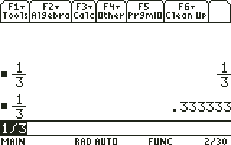
- Compare the two. The history shows both: 1/3 from ENTER and .333333 from ◆ ENTER. Pick whichever the question asks for.
What the screen shows
The history shows both: 1/3 from ENTER and .333333 from ◆ ENTER. Pick whichever the question asks for.
Look for .333 on the screen.
Try it with the keys lit up
This guide is one of E-Code's Learn lessons. Open it on E-Code's TI-89 calculator and each key lights up in turn as you press it.
Try “Get a decimal instead of a fraction” on the TI-89 calculator
Related
- Plug a value into an expression
- Reuse an old answer
- Define your own function
- Find a command in the catalog
Math programs for the TI-89 Titanium:
- Quadratic roots, exact when possible
- Linear system, exact answers
- Fraction calculator: exact, mixed, decimal
All TI-89 hidden tricks guides · All TI-89 guides · All calculator guides