 E-Code
How to type scientific notation on a TI-84 Plus CE, TI-84 Plus or TI-83 Plus
Type the number, press 2nd and the comma key for EE (× 10^), then type the power: 6.02 EE 23 is 6.02 × 10²³. EE keeps the number in one piece, so it needs no brackets.
Step by step
- Type 6.02. 6 . 0 2 Type 6 . 0 2.
- EE: times ten to the. 2nd , Press 2nd, then the comma key. EE (above the comma) means × 10^ and shows as a small E.
- The power. 2 3 Type 2 3. That's 6.02 × 10²³, with no brackets to forget.
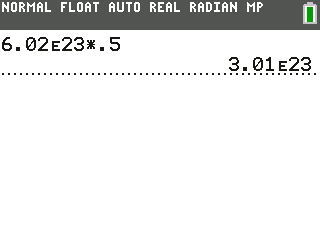
- Half a mole. × . 5 Press × then . 5 to find the particles in half a mole.
- Get the answer. ENTER Press ENTER.
- Why it matters. Typed by hand, 1/6.02×10^23 is wrong without brackets; 1/6.02E23 is always right. EE keeps the number in one piece.
What the screen shows
Typed by hand, 1/6.02×10^23 is wrong without brackets; 1/6.02E23 is always right. EE keeps the number in one piece.
Look for 3.01 on the screen.
Try it with the keys lit up
This guide is one of E-Code's Learn lessons. Open it on E-Code's TI-84 calculator and each key lights up in turn as you press it.
Try “Type scientific notation” on the TI-84 calculator
Related
- Solve a physics formula for any letter (TI-84 Plus CE)
- Solve a physics formula for any letter (TI-84 Plus)
- Store a constant in a letter
- Show answers in scientific notation
- Fit a curve to data
Physics programs for the TI-84 Plus CE:
All TI-84 science guides · All TI-84 guides · All calculator guides