 E-Code
How to solve any equation on a TI-84 Plus CE
Press MATH, then ▲ to jump to Numeric Solver, and ENTER. Type the left side in E1 and the right side in E2, press GRAPH (the key under OK), then GRAPH again (under SOLVE) with the cursor on the letter.
Step by step
- Open the MATH menu. MATH Press MATH. Its last item is a full equation solver that most people never scroll down to.
- Jump to the bottom. ▲ Press ▲. The list wraps round to its last item, Numeric Solver.
- Open the Solver. ENTER Press ENTER. The solver takes an equation as two sides, E1 = E2.
- Type the left side. 2 ^ X,T,θ,n To solve 2ˣ = 10, type the left side into E1: 2 ^ X,T,θ,n.
- Move down to E2. ENTER Press ENTER to move down to E2, the right side.
- Type the right side. 1 0 Type 1 0.
- Press OK. GRAPH Press GRAPH, the key right under OK on the screen. On the CE the top row of keys works as buttons for whatever the bottom of the screen shows.
- Solve. GRAPH The cursor is on X. Press GRAPH again: now it's the key under SOLVE.
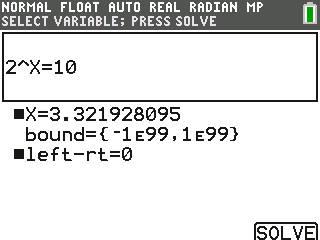
- There's your answer. X = 3.3219…, so 2 to the power 3.32 is 10. The ■ marks the letter it solved; left-rt = 0 means both sides match.
What the screen shows
X = 3.3219…, so 2 to the power 3.32 is 10. The ■ marks the letter it solved; left-rt = 0 means both sides match.
Look for 3.32 on the screen.
Try it with the keys lit up
This guide is one of E-Code's Learn lessons. Open it on E-Code's TI-84 calculator and each key lights up in turn as you press it.
Try “Solve any equation” on the TI-84 calculator
Related
- Solve any equation (TI-84 Plus)
- Find the zeros of a function
- Find where two graphs cross
- Find the maximum or minimum of a graph
- Make a table of values
Math programs for the TI-84 Plus CE:
All TI-84 algebra guides · All TI-84 guides · All calculator guides