 E-Code
How to solve any equation on a TI-84 Plus or TI-83 Plus
Press MATH, then ▲ to jump to Solver, and ENTER. Type the equation as 0 = left side − right side, press ENTER, then ALPHA and ENTER (SOLVE) with the cursor on the letter.
Step by step
- Open the MATH menu. MATH Press MATH. Its last item is a full equation solver that most people never scroll down to.
- Jump to the bottom. ▲ Press ▲. The list wraps round to the last item, Solver.
- Open the Solver. ENTER Press ENTER. The solver wants the equation with 0 on one side: eqn:0=.
- Type the equation. 2 ^ X,T,θ,n − 1 0 To solve 2ˣ = 10, move the 10 across: 0 = 2ˣ − 10. Type 2 ^ X,T,θ,n − 1 0.
- Confirm it. ENTER Press ENTER. Now the solver lists X with a starting guess, and the bound it searches in.
- Solve. ALPHA ENTER The cursor is on X. Press ALPHA, then ENTER. SOLVE is written above ENTER.
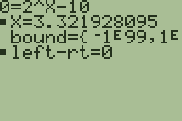
- There's your answer. X = 3.3219…, so 2 to the power 3.32 is 10. The ■ marks the letter it solved; left-rt = 0 means both sides match.
What the screen shows
X = 3.3219…, so 2 to the power 3.32 is 10. The ■ marks the letter it solved; left-rt = 0 means both sides match.
Look for 3.32 on the screen.
Try it with the keys lit up
This guide is one of E-Code's Learn lessons. Open it on E-Code's TI-84 calculator and each key lights up in turn as you press it.
Try “Solve any equation” on the TI-84 calculator
Related
- Solve any equation (TI-84 Plus CE)
- Find the zeros of a function
- Find where two graphs cross
- Find the maximum or minimum of a graph
- Make a table of values
Math programs for the TI-84 Plus CE:
All TI-84 algebra guides · All TI-84 guides · All calculator guides