 E-Code
How to convert units on a TI-89 Titanium
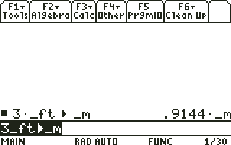
Type the value with its unit (◆ MODE types _, so 3_ft), press 2nd MODE for ▶, type the new unit (_m) and press ENTER: 3_ft▶_m gives .9144·_m.
Step by step
- Type 3 and an underscore. 3 ◆ MODE Press 3, then ◆ and MODE. ◆ MODE types _, which starts a unit name.
- Name the unit: ft. ALPHA | T Press ALPHA then | for f, then T. T has its own key, so it needs no ALPHA. 3_ft is 3 feet.
- Type ▶ (convert). 2nd MODE Press 2nd, then MODE. ▶ is written above MODE; it means convert to.
- Name the new unit: _m. ◆ MODE ALPHA 5 Press ◆ MODE for _, then ALPHA and 5 for m. _m is metres.
- Convert it. ENTER Press ENTER.
- Read the answer. 3 feet is .9144 metres. Any two units of the same kind convert this way.
What the screen shows
3 feet is .9144 metres. Any two units of the same kind convert this way.
Look for .9144·_m on the screen.
Try it with the keys lit up
This guide is one of E-Code's Learn lessons. Open it on E-Code's TI-89 calculator and each key lights up in turn as you press it.
Try “Convert units” on the TI-89 calculator
Related
- Use built-in physics constants
- Solve a formula for any variable
- Use scientific notation
- Use units in a calculation
Physics programs for the TI-89 Titanium:
- Projectile from a height (dialog, m or ft)
- Kinematics: leave the two unknowns blank
- Rocket launch, step by step
All TI-89 science guides · All TI-89 guides · All calculator guides