 E-Code
How to reuse an old answer on a TI-84 Plus CE or TI-84 Plus
Press ▲ to scroll up into your history until the answer you want is highlighted, then press ENTER to paste it where you type. 2nd ENTRY (2nd, then ENTER) brings back the whole last line.
Before you start
Work out 2+3 and 10/4 first, so there is something in your history.
2 + 3 ENTER 1 0 ÷ 4 ENTER
Step by step
- Scroll up into your history. ▲ Press ▲. Your last answer, 2.5, lights up. Keep pressing ▲ to reach older answers and the lines you typed.
- Paste it. ENTER Press ENTER. The highlighted answer is copied down to where you type, ready to use.
- Use it. × 2 Press × then 2 to double it.
- Get the answer. ENTER Press ENTER.
- Bring back the whole line. 2nd ENTER Press 2nd, then ENTER. ENTRY (written above ENTER) brings back the line you just typed, so you can change one number instead of retyping it.
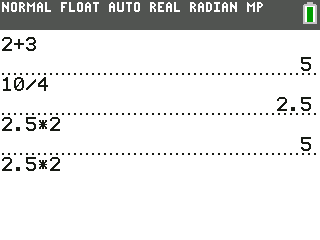
What the screen shows
Look for 2.5 on the screen.
Try it with the keys lit up
This guide is one of E-Code's Learn lessons. Open it on E-Code's TI-84 calculator and each key lights up in turn as you press it.
Try “Reuse an old answer” on the TI-84 calculator
Related
- Reuse an old line (TI-83 Plus)
- Keep going from the last answer
- Store a number in a letter
- Find any command in the catalog (TI-84 Plus)
- Find any command in the catalog (TI-84 Plus CE)
Math programs for the TI-84 Plus CE:
All TI-84 hidden tricks guides · All TI-84 guides · All calculator guides