 E-Code
How to reuse an old line on a TI-83 Plus
Press 2nd, then ENTER: ENTRY brings back the last line you typed, and each extra press goes one line further back. Start a new line with × (or + − ÷) and Ans, the last answer, is filled in for you.
Before you start
Work out 2+3 and 10/4 first, so there are lines to bring back.
2 + 3 ENTER 1 0 ÷ 4 ENTER
Step by step
- Bring back your last line. 2nd ENTER Press 2nd, then ENTER. ENTRY (written above ENTER) brings back 10/4, the last line you typed, so you can change it instead of retyping it.
- Go one line further back. 2nd ENTER Press 2nd, then ENTER again. Each press goes one line further back: now it's 2+3.
- Work it out again. ENTER Press ENTER. The line you brought back runs like one you just typed.
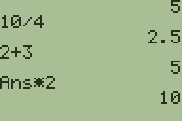
- Start with ×. × 2 Press × then 2. Start a line with × and the calculator writes Ans for you: Ans is the last answer, 5.
- Get the answer. ENTER Press ENTER. Ans × 2 is 10.
What the screen shows
Look for 10 on the screen.
Try it with the keys lit up
This guide is one of E-Code's Learn lessons. Open it on E-Code's TI-84 calculator and each key lights up in turn as you press it.
Try “Reuse an old line” on the TI-84 calculator
Related
- Reuse an old answer
- Keep going from the last answer
- Store a number in a letter
- Find any command in the catalog (TI-84 Plus)
- Find any command in the catalog (TI-84 Plus CE)
Math programs for the TI-84 Plus CE:
All TI-84 hidden tricks guides · All TI-84 guides · All calculator guides